

- Home
- SEODiscover the latest updates from across the United States, including politics, culture, economy, and trending stories. Stay informed on the key events shaping the nation and the topics everyone’s talking about.
- Technical SEOLearn technical SEO concepts including crawling, indexing, XML sitemaps, robots.txt, canonical tags, site architecture, and website performance.
- Local SEOOptimize your business for local seo with Google Business Profile, local citations, reviews, maps, and location-based SEO.
- Mobile SEOImprove your website’s mobile seo performance with responsive design, mobile-first indexing, usability, and page speed optimization.
- On-Page SEOExplore on-page seo optimization techniques such as title tags, meta descriptions, headings, URLs, internal linking, and content optimization.
- Off-Page SEODiscover off-page SEO strategies such as backlinks, digital PR, brand mentions, outreach, and authority building.
- SEO ToolsExplore the best SEO tools for keyword research, technical audits, backlink analysis, rank tracking, and website optimization.
- Core Web VitalsLearn how to improve Core Web Vitals including LCP, INP, CLS, page speed, and overall user experience for better rankings.
- Keyword ResearchLearn how to find profitable keywords, analyze search intent, evaluate competition, and build effective keyword strategies.
- Link BuildingMaster ethical link building techniques, backlink analysis, outreach methods, guest posting, and authority growth strategies.
- Google Search ConsoleLearn how to use Google Search Console to monitor indexing, fix errors, analyze search performance, and improve SEO.
- SEO BasicsLearn the fundamentals of search engine optimization (SEO Basics), including how search engines work, SEO terminology, and beginner-friendly best practices.
- Paid Media
- Display AdvertisingLearn display advertising strategies, banner ads, audience targeting, remarketing, Google Display campaigns, and optimization techniques.
- Google AdsLearn Google Ads strategies, campaign setup, bidding, keywords, Performance Max, Search Ads, and optimization techniques.
- LinkedIn AdsLearn LinkedIn Ads strategies for B2B marketing, lead generation, audience targeting, campaign optimization, and paid social advertising.
- Meta AdsLearn Meta Ads strategies for Facebook and Instagram, including campaign setup, targeting, retargeting, and performance optimization.
- Paid Media AnalyticsLearn paid media analytics, including CPC, CTR, CPA, ROAS, conversion tracking, attribution, reporting, and campaign performance analysis.
- PPC StrategyLearn effective PPC strategies, campaign planning, bidding, keyword targeting, landing pages, conversion optimization, and more.
- ContentTransform your living spaces with inspiration, tips, and trends in interior design. From minimalist decor to bold statements, find ideas for every style and budget.
- Social
- Digital MarketingExplore stories and advice on living your best life. From personal growth to entertainment, dive into the latest in lifestyle trends and inspiration.
- Artificial IntelligenceStay informed about health and wellness with expert advice, fitness tips, and the latest medical breakthroughs. Your guide to a healthier and happier life.
- DevelopmentYou will find development related educational articles
- GTMLearn Google Tag Manager (GTM) with practical guides for tags, triggers, variables, tracking, conversions, and website analytics implementation.
- HTMLLearn HTML with simple tutorials, examples, tags, elements, attributes, and best practices for building modern web pages.
- HTML CSSLearn HTML CSS together with practical tutorials, examples, layouts, styling techniques, responsive design, and modern web development practices.
- HTML JSLearn HTML JS – JavaScript with practical tutorials and examples for adding interactivity, dynamic content, events, and functionality to web pages.
- JavaScriptExplore JavaScript tutorials, examples, concepts, and practical techniques for creating interactive and dynamic websites and web applications.
- PHPLearn PHP programming with practical tutorials, examples, functions, syntax, and web development techniques for beginners and developers.
- PythonLearn Python programming with practical tutorials, examples, syntax, functions, automation techniques, and useful programming concepts.
- Home
- SEODiscover the latest updates from across the United States, including politics, culture, economy, and trending stories. Stay informed on the key events shaping the nation and the topics everyone’s talking about.
- Technical SEOLearn technical SEO concepts including crawling, indexing, XML sitemaps, robots.txt, canonical tags, site architecture, and website performance.
- Local SEOOptimize your business for local seo with Google Business Profile, local citations, reviews, maps, and location-based SEO.
- Mobile SEOImprove your website’s mobile seo performance with responsive design, mobile-first indexing, usability, and page speed optimization.
- On-Page SEOExplore on-page seo optimization techniques such as title tags, meta descriptions, headings, URLs, internal linking, and content optimization.
- Off-Page SEODiscover off-page SEO strategies such as backlinks, digital PR, brand mentions, outreach, and authority building.
- SEO ToolsExplore the best SEO tools for keyword research, technical audits, backlink analysis, rank tracking, and website optimization.
- Core Web VitalsLearn how to improve Core Web Vitals including LCP, INP, CLS, page speed, and overall user experience for better rankings.
- Keyword ResearchLearn how to find profitable keywords, analyze search intent, evaluate competition, and build effective keyword strategies.
- Link BuildingMaster ethical link building techniques, backlink analysis, outreach methods, guest posting, and authority growth strategies.
- Google Search ConsoleLearn how to use Google Search Console to monitor indexing, fix errors, analyze search performance, and improve SEO.
- SEO BasicsLearn the fundamentals of search engine optimization (SEO Basics), including how search engines work, SEO terminology, and beginner-friendly best practices.
- Paid Media
- Display AdvertisingLearn display advertising strategies, banner ads, audience targeting, remarketing, Google Display campaigns, and optimization techniques.
- Google AdsLearn Google Ads strategies, campaign setup, bidding, keywords, Performance Max, Search Ads, and optimization techniques.
- LinkedIn AdsLearn LinkedIn Ads strategies for B2B marketing, lead generation, audience targeting, campaign optimization, and paid social advertising.
- Meta AdsLearn Meta Ads strategies for Facebook and Instagram, including campaign setup, targeting, retargeting, and performance optimization.
- Paid Media AnalyticsLearn paid media analytics, including CPC, CTR, CPA, ROAS, conversion tracking, attribution, reporting, and campaign performance analysis.
- PPC StrategyLearn effective PPC strategies, campaign planning, bidding, keyword targeting, landing pages, conversion optimization, and more.
- ContentTransform your living spaces with inspiration, tips, and trends in interior design. From minimalist decor to bold statements, find ideas for every style and budget.
- Social
- Digital MarketingExplore stories and advice on living your best life. From personal growth to entertainment, dive into the latest in lifestyle trends and inspiration.
- Artificial IntelligenceStay informed about health and wellness with expert advice, fitness tips, and the latest medical breakthroughs. Your guide to a healthier and happier life.
- DevelopmentYou will find development related educational articles
- GTMLearn Google Tag Manager (GTM) with practical guides for tags, triggers, variables, tracking, conversions, and website analytics implementation.
- HTMLLearn HTML with simple tutorials, examples, tags, elements, attributes, and best practices for building modern web pages.
- HTML CSSLearn HTML CSS together with practical tutorials, examples, layouts, styling techniques, responsive design, and modern web development practices.
- HTML JSLearn HTML JS – JavaScript with practical tutorials and examples for adding interactivity, dynamic content, events, and functionality to web pages.
- JavaScriptExplore JavaScript tutorials, examples, concepts, and practical techniques for creating interactive and dynamic websites and web applications.
- PHPLearn PHP programming with practical tutorials, examples, functions, syntax, and web development techniques for beginners and developers.
- PythonLearn Python programming with practical tutorials, examples, syntax, functions, automation techniques, and useful programming concepts.
Now Reading: Cross Domain Tracking in GA4: Complete Setup Guide
-
01
Cross Domain Tracking in GA4: Complete Setup Guide
- Home//
- SEO//Discover the latest updates from across the United States, including politics, culture, economy, and trending stories. Stay informed on the key events shaping the nation and the topics everyone’s talking about.
- Technical SEO//Learn technical SEO concepts including crawling, indexing, XML sitemaps, robots.txt, canonical tags, site architecture, and website performance.
- Local SEO//Optimize your business for local seo with Google Business Profile, local citations, reviews, maps, and location-based SEO.
- Mobile SEO//Improve your website’s mobile seo performance with responsive design, mobile-first indexing, usability, and page speed optimization.
- On-Page SEO//Explore on-page seo optimization techniques such as title tags, meta descriptions, headings, URLs, internal linking, and content optimization.
- Off-Page SEO//Discover off-page SEO strategies such as backlinks, digital PR, brand mentions, outreach, and authority building.
- SEO Tools//Explore the best SEO tools for keyword research, technical audits, backlink analysis, rank tracking, and website optimization.
- Core Web Vitals//Learn how to improve Core Web Vitals including LCP, INP, CLS, page speed, and overall user experience for better rankings.
- Keyword Research//Learn how to find profitable keywords, analyze search intent, evaluate competition, and build effective keyword strategies.
- Link Building//Master ethical link building techniques, backlink analysis, outreach methods, guest posting, and authority growth strategies.
- Google Search Console//Learn how to use Google Search Console to monitor indexing, fix errors, analyze search performance, and improve SEO.
- SEO Basics//Learn the fundamentals of search engine optimization (SEO Basics), including how search engines work, SEO terminology, and beginner-friendly best practices.
- Paid Media//
- Display Advertising//Learn display advertising strategies, banner ads, audience targeting, remarketing, Google Display campaigns, and optimization techniques.
- Google Ads//Learn Google Ads strategies, campaign setup, bidding, keywords, Performance Max, Search Ads, and optimization techniques.
- LinkedIn Ads//Learn LinkedIn Ads strategies for B2B marketing, lead generation, audience targeting, campaign optimization, and paid social advertising.
- Meta Ads//Learn Meta Ads strategies for Facebook and Instagram, including campaign setup, targeting, retargeting, and performance optimization.
- Paid Media Analytics//Learn paid media analytics, including CPC, CTR, CPA, ROAS, conversion tracking, attribution, reporting, and campaign performance analysis.
- PPC Strategy//Learn effective PPC strategies, campaign planning, bidding, keyword targeting, landing pages, conversion optimization, and more.
- Content//Transform your living spaces with inspiration, tips, and trends in interior design. From minimalist decor to bold statements, find ideas for every style and budget.
- Social//
- Digital Marketing//Explore stories and advice on living your best life. From personal growth to entertainment, dive into the latest in lifestyle trends and inspiration.
- Artificial Intelligence//Stay informed about health and wellness with expert advice, fitness tips, and the latest medical breakthroughs. Your guide to a healthier and happier life.
- Development//You will find development related educational articles
- GTM//Learn Google Tag Manager (GTM) with practical guides for tags, triggers, variables, tracking, conversions, and website analytics implementation.
- HTML//Learn HTML with simple tutorials, examples, tags, elements, attributes, and best practices for building modern web pages.
- HTML CSS//Learn HTML CSS together with practical tutorials, examples, layouts, styling techniques, responsive design, and modern web development practices.
- HTML JS//Learn HTML JS – JavaScript with practical tutorials and examples for adding interactivity, dynamic content, events, and functionality to web pages.
- JavaScript//Explore JavaScript tutorials, examples, concepts, and practical techniques for creating interactive and dynamic websites and web applications.
- PHP//Learn PHP programming with practical tutorials, examples, functions, syntax, and web development techniques for beginners and developers.
- Python//Learn Python programming with practical tutorials, examples, syntax, functions, automation techniques, and useful programming concepts.
- Home
- SEO
- Technical SEO
- Cross Domain Tracking in GA4: Complete Setup Guide
Cross Domain Tracking in GA4: Complete Setup Guide

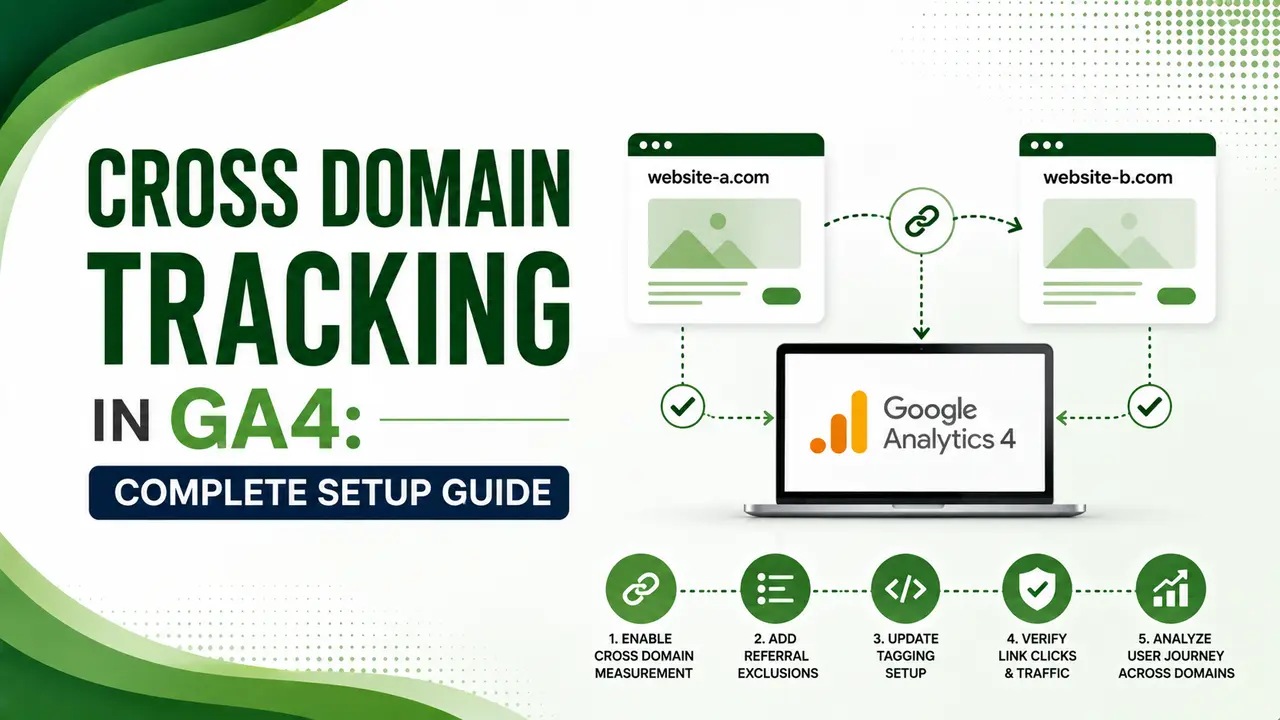
Cross domain tracking in GA4 stops a real customer from looking like two visitors. Here's the complete setup, plus the mistakes that quietly break it.
Table of Contents
ToggleCross domain tracking in GA4 is what stops a real customer from looking like two different people in your reports. Without it, someone browsing your main site, then clicking through to checkout.yoursite-payments.com, gets counted as a brand-new visitor the moment the domain changes, and the campaign that actually brought them disappears entirely.
GA4 uses first-party cookies by default, which only work on the single domain that set them. Cross domain tracking passes an identifier between domains through a URL parameter, so the second domain can pick up exactly where the first one left off.
The setup itself is simpler than it used to be in Universal Analytics. Getting it fully correct, especially across cookie consent, redirects, and third-party checkout tools, is where most implementations quietly break.
01Cross Domain Tracking Explained
Google's own documentation defines it plainly: cross-domain measurement allows activity to be accurately attributed to a single user as they move across domains. Without it, a single visitor to different root domains gets assigned new cookies and new IDs on each one.
Refact's guide adds the mechanism behind it: GA4 passes tracking details through a URL parameter called _gl. When someone clicks from Domain A to Domain B, that parameter carries the identifiers needed so the second domain continues the same session instead of starting fresh.
02When You Actually Need Cross Domain Tracking
Analytics-Tips' guide offers the clearest decision rule available: one brand, one strategy, one sales funnel means one GA4 property with properly configured cross-domain tracking. Different businesses or independent teams should stay as two separate properties without it.
Zeo's guide adds a detail worth confirming first: GA4 handles subdomains automatically. You don't need cross domain tracking for something like blog.yoursite.com to shop.yoursite.com, only for genuinely separate root domains.
Analytics Mania's guide notes when cross-domain tracking fails, session data often splits in a way that inflates "New User" and "Session" counts by 30% to 50%, depending on how many visitors move between your domains. It's rarely a subtle problem once it's broken.
03Before You Start: What You Need
Devrix's March 2026 guide lists the requirements clearly: all domains must send data to the same GA4 Measurement ID, you need Editor-level admin access across every domain involved, and a clear understanding of your current URL parameters so the _gl tag doesn't conflict with existing query strings.
Analytics Mania's setup guide adds one important limitation: this native solution works when users navigate between domains by clicking a link. It won't work for form submissions or server-side redirects without additional custom handling.
04Step-by-Step Setup in GA4
Markana Media's May 2026 guide walks through the exact path: go to Admin, select your web data stream, scroll to Configure Tag Settings, then click Configure Your Domains under Cross-Domain Measurement. Add every domain in the user journey, without the protocol and without trailing slashes.
The same guide flags a detail people miss constantly: GA4 won't automatically assume www and non-www versions are the same domain. If your journey includes www.yoursite.com, yoursite.com, and checkout.yoursite.com, list each variation separately.
| Step | Where | What To Do |
|---|---|---|
| 1. Open Data Streams | Admin → Property → Data Streams | Select your primary web data stream |
| 2. Configure Tag Settings | Bottom of the web stream details page | Click "Configure tag settings" |
| 3. Add domains | "Configure your domains" | List every domain, no protocol, no trailing slash |
| 4. Test | Browser address bar / DebugView | Click through and confirm the _gl parameter appears |
05Verifying the _gl Parameter
KRM Digital's guide gives the simplest confirmation method: click a link from your first domain to your second, then check the destination URL. A parameter starting with ?_gl= or &_gl= followed by a character string means it's working.
ACCS-Net's guide adds an important, easy-to-miss detail: the timestamp inside _gl invalidates after roughly two minutes. That's by design, so users can't bookmark a decorated URL and accidentally impersonate another visitor's client ID later.
06GTM Linker Configuration Example
For teams managing this through Google Tag Manager instead of the native GA4 admin panel, here's the linker parameter structure.
// In your Google tag configuration in GTM
// Configuration Parameter: linker
// Value:

{
  "domains": ["example.com", "checkout-example.com"],
  "url_position": "fragment"
}

// Note: setting the linker parameter this way overrides
// any domains configured in the GA4 Admin interface.
// Choose one method, not both, to avoid conflicts.
07Common Reasons It Breaks
Markana Media's guide, referenced above, describes a real client case: a "URL beautification" script stripped all query parameters from links, silently removing the _gl parameter and breaking funnel tracking for two months before anyone noticed.
ACCS-Net's guide, referenced above, flags mixed protocols as another common failure point. Browsers strip query parameters on HTTPS-to-HTTP downgrades, so any link in the chain going from secure to non-secure will drop the _gl parameter mid-flow. Forcing HTTPS everywhere in the journey avoids this entirely.
Ficilcom's guide makes a point worth acting on directly: after configuring cross-domain tracking, register each domain in the "List Unwanted Referrals" setting too. Skipping this step means GA4 still logs a self-referral between your own domains, muddying the exact attribution picture you just fixed.
08Setup Checklist
Confirm each of these before considering the setup complete.
Same Measurement ID everywhere. All domains must send data to the identical GA4 property.
List every domain variant. www, non-www, and any subdomain used in the journey need separate entries.
Add domains to unwanted referrals to prevent self-referral pollution in your reports.
Force HTTPS across the entire journey to avoid the _gl parameter getting stripped mid-flow.
Test with a real click-through, not just a page reload, and confirm _gl appears in DebugView.
09Is Your Setup Actually Working?
Answer a few quick questions to check your current implementation.
Is Your Setup Actually Working?
Select the option that matches your property
10Common Questions
Do I need cross domain tracking for subdomains?
No. GA4 automatically handles subdomains using the same cookie domain. Cross domain tracking is only needed for genuinely separate root domains, like example.com to a third-party checkout.com.
Does cross domain tracking work with form submissions?
Not natively. The native setup relies on link clicks to append the _gl parameter. Form submissions and server-side redirects need additional custom handling to pass the client ID.
Why does GA4 still show a self-referral after I set this up?
You likely haven't added the domains to the Unwanted Referrals list. Cross-domain configuration and the referral exclusion list are two separate settings, both are needed.
Can I track a single session across two different GA4 properties?
No. Cross domain tracking only works within a single GA4 property and Measurement ID. Two separate properties cannot share one continuous session.
Why did my tracking break after a developer added a URL cleanup script?
Scripts that strip query parameters for "clean" URLs often remove the _gl parameter along with everything else, silently breaking cross-domain session continuity without any visible error.
Related Articles
What We Learn Today
Without it, cross-domain visitors look like brand new users
GA4 handles subdomains automatically, no setup needed there
The _gl parameter carries identity between domains via link clicks
Always list www, non-www, and subdomain variants separately
Add domains to unwanted referrals to prevent self-referral noise
Mixed HTTP/HTTPS in the journey silently strips the _gl parameter
Build a Complete Clean-Data Measurement Stack
Cross domain tracking pairs directly with clean bot filtering and referral spam control. Explore both guides next.
Related Posts


Previous Post
Next Post
Previous Post

Next Post





- Artificial Intelligence
- Content
- Core Web Vitals
- Development
- Digital Marketing
- Display Advertising
- Google Ads
- Google Search Console
- GTM
- HTML
- HTML CSS
- JavaScript
- Keyword Research
- Link Building
- LinkedIn Ads
- Local SEO
- Meta Ads
- Mobile SEO
- Off-Page SEO
- On-Page SEO
- Paid Media
- Paid Media Analytics
- PHP
- PPC Strategy
- Python
- SEO
- SEO Basics
- SEO Tools
- Social
- Technical SEO




