

- Home
- SEODiscover the latest updates from across the United States, including politics, culture, economy, and trending stories. Stay informed on the key events shaping the nation and the topics everyone’s talking about.
- Technical SEOLearn technical SEO concepts including crawling, indexing, XML sitemaps, robots.txt, canonical tags, site architecture, and website performance.
- Local SEOOptimize your business for local seo with Google Business Profile, local citations, reviews, maps, and location-based SEO.
- Mobile SEOImprove your website’s mobile seo performance with responsive design, mobile-first indexing, usability, and page speed optimization.
- On-Page SEOExplore on-page seo optimization techniques such as title tags, meta descriptions, headings, URLs, internal linking, and content optimization.
- Off-Page SEODiscover off-page SEO strategies such as backlinks, digital PR, brand mentions, outreach, and authority building.
- SEO ToolsExplore the best SEO tools for keyword research, technical audits, backlink analysis, rank tracking, and website optimization.
- Core Web VitalsLearn how to improve Core Web Vitals including LCP, INP, CLS, page speed, and overall user experience for better rankings.
- Keyword ResearchLearn how to find profitable keywords, analyze search intent, evaluate competition, and build effective keyword strategies.
- Link BuildingMaster ethical link building techniques, backlink analysis, outreach methods, guest posting, and authority growth strategies.
- Google Search ConsoleLearn how to use Google Search Console to monitor indexing, fix errors, analyze search performance, and improve SEO.
- SEO BasicsLearn the fundamentals of search engine optimization (SEO Basics), including how search engines work, SEO terminology, and beginner-friendly best practices.
- Paid Media
- Display AdvertisingLearn display advertising strategies, banner ads, audience targeting, remarketing, Google Display campaigns, and optimization techniques.
- Google AdsLearn Google Ads strategies, campaign setup, bidding, keywords, Performance Max, Search Ads, and optimization techniques.
- LinkedIn AdsLearn LinkedIn Ads strategies for B2B marketing, lead generation, audience targeting, campaign optimization, and paid social advertising.
- Meta AdsLearn Meta Ads strategies for Facebook and Instagram, including campaign setup, targeting, retargeting, and performance optimization.
- Paid Media AnalyticsLearn paid media analytics, including CPC, CTR, CPA, ROAS, conversion tracking, attribution, reporting, and campaign performance analysis.
- PPC StrategyLearn effective PPC strategies, campaign planning, bidding, keyword targeting, landing pages, conversion optimization, and more.
- ContentTransform your living spaces with inspiration, tips, and trends in interior design. From minimalist decor to bold statements, find ideas for every style and budget.
- Social
- Digital MarketingExplore stories and advice on living your best life. From personal growth to entertainment, dive into the latest in lifestyle trends and inspiration.
- Artificial IntelligenceStay informed about health and wellness with expert advice, fitness tips, and the latest medical breakthroughs. Your guide to a healthier and happier life.
- DevelopmentYou will find development related educational articles
- GTMLearn Google Tag Manager (GTM) with practical guides for tags, triggers, variables, tracking, conversions, and website analytics implementation.
- HTMLLearn HTML with simple tutorials, examples, tags, elements, attributes, and best practices for building modern web pages.
- HTML CSSLearn HTML CSS together with practical tutorials, examples, layouts, styling techniques, responsive design, and modern web development practices.
- HTML JSLearn HTML JS – JavaScript with practical tutorials and examples for adding interactivity, dynamic content, events, and functionality to web pages.
- JavaScriptExplore JavaScript tutorials, examples, concepts, and practical techniques for creating interactive and dynamic websites and web applications.
- PHPLearn PHP programming with practical tutorials, examples, functions, syntax, and web development techniques for beginners and developers.
- PythonLearn Python programming with practical tutorials, examples, syntax, functions, automation techniques, and useful programming concepts.
- Home
- SEODiscover the latest updates from across the United States, including politics, culture, economy, and trending stories. Stay informed on the key events shaping the nation and the topics everyone’s talking about.
- Technical SEOLearn technical SEO concepts including crawling, indexing, XML sitemaps, robots.txt, canonical tags, site architecture, and website performance.
- Local SEOOptimize your business for local seo with Google Business Profile, local citations, reviews, maps, and location-based SEO.
- Mobile SEOImprove your website’s mobile seo performance with responsive design, mobile-first indexing, usability, and page speed optimization.
- On-Page SEOExplore on-page seo optimization techniques such as title tags, meta descriptions, headings, URLs, internal linking, and content optimization.
- Off-Page SEODiscover off-page SEO strategies such as backlinks, digital PR, brand mentions, outreach, and authority building.
- SEO ToolsExplore the best SEO tools for keyword research, technical audits, backlink analysis, rank tracking, and website optimization.
- Core Web VitalsLearn how to improve Core Web Vitals including LCP, INP, CLS, page speed, and overall user experience for better rankings.
- Keyword ResearchLearn how to find profitable keywords, analyze search intent, evaluate competition, and build effective keyword strategies.
- Link BuildingMaster ethical link building techniques, backlink analysis, outreach methods, guest posting, and authority growth strategies.
- Google Search ConsoleLearn how to use Google Search Console to monitor indexing, fix errors, analyze search performance, and improve SEO.
- SEO BasicsLearn the fundamentals of search engine optimization (SEO Basics), including how search engines work, SEO terminology, and beginner-friendly best practices.
- Paid Media
- Display AdvertisingLearn display advertising strategies, banner ads, audience targeting, remarketing, Google Display campaigns, and optimization techniques.
- Google AdsLearn Google Ads strategies, campaign setup, bidding, keywords, Performance Max, Search Ads, and optimization techniques.
- LinkedIn AdsLearn LinkedIn Ads strategies for B2B marketing, lead generation, audience targeting, campaign optimization, and paid social advertising.
- Meta AdsLearn Meta Ads strategies for Facebook and Instagram, including campaign setup, targeting, retargeting, and performance optimization.
- Paid Media AnalyticsLearn paid media analytics, including CPC, CTR, CPA, ROAS, conversion tracking, attribution, reporting, and campaign performance analysis.
- PPC StrategyLearn effective PPC strategies, campaign planning, bidding, keyword targeting, landing pages, conversion optimization, and more.
- ContentTransform your living spaces with inspiration, tips, and trends in interior design. From minimalist decor to bold statements, find ideas for every style and budget.
- Social
- Digital MarketingExplore stories and advice on living your best life. From personal growth to entertainment, dive into the latest in lifestyle trends and inspiration.
- Artificial IntelligenceStay informed about health and wellness with expert advice, fitness tips, and the latest medical breakthroughs. Your guide to a healthier and happier life.
- DevelopmentYou will find development related educational articles
- GTMLearn Google Tag Manager (GTM) with practical guides for tags, triggers, variables, tracking, conversions, and website analytics implementation.
- HTMLLearn HTML with simple tutorials, examples, tags, elements, attributes, and best practices for building modern web pages.
- HTML CSSLearn HTML CSS together with practical tutorials, examples, layouts, styling techniques, responsive design, and modern web development practices.
- HTML JSLearn HTML JS – JavaScript with practical tutorials and examples for adding interactivity, dynamic content, events, and functionality to web pages.
- JavaScriptExplore JavaScript tutorials, examples, concepts, and practical techniques for creating interactive and dynamic websites and web applications.
- PHPLearn PHP programming with practical tutorials, examples, functions, syntax, and web development techniques for beginners and developers.
- PythonLearn Python programming with practical tutorials, examples, syntax, functions, automation techniques, and useful programming concepts.
Now Reading: Lazy Loading Images Explained: Best Practices That Improve LCP Without Hurting SEO
-
01
Lazy Loading Images Explained: Best Practices That Improve LCP Without Hurting SEO
- Home//
- SEO//Discover the latest updates from across the United States, including politics, culture, economy, and trending stories. Stay informed on the key events shaping the nation and the topics everyone’s talking about.
- Technical SEO//Learn technical SEO concepts including crawling, indexing, XML sitemaps, robots.txt, canonical tags, site architecture, and website performance.
- Local SEO//Optimize your business for local seo with Google Business Profile, local citations, reviews, maps, and location-based SEO.
- Mobile SEO//Improve your website’s mobile seo performance with responsive design, mobile-first indexing, usability, and page speed optimization.
- On-Page SEO//Explore on-page seo optimization techniques such as title tags, meta descriptions, headings, URLs, internal linking, and content optimization.
- Off-Page SEO//Discover off-page SEO strategies such as backlinks, digital PR, brand mentions, outreach, and authority building.
- SEO Tools//Explore the best SEO tools for keyword research, technical audits, backlink analysis, rank tracking, and website optimization.
- Core Web Vitals//Learn how to improve Core Web Vitals including LCP, INP, CLS, page speed, and overall user experience for better rankings.
- Keyword Research//Learn how to find profitable keywords, analyze search intent, evaluate competition, and build effective keyword strategies.
- Link Building//Master ethical link building techniques, backlink analysis, outreach methods, guest posting, and authority growth strategies.
- Google Search Console//Learn how to use Google Search Console to monitor indexing, fix errors, analyze search performance, and improve SEO.
- SEO Basics//Learn the fundamentals of search engine optimization (SEO Basics), including how search engines work, SEO terminology, and beginner-friendly best practices.
- Paid Media//
- Display Advertising//Learn display advertising strategies, banner ads, audience targeting, remarketing, Google Display campaigns, and optimization techniques.
- Google Ads//Learn Google Ads strategies, campaign setup, bidding, keywords, Performance Max, Search Ads, and optimization techniques.
- LinkedIn Ads//Learn LinkedIn Ads strategies for B2B marketing, lead generation, audience targeting, campaign optimization, and paid social advertising.
- Meta Ads//Learn Meta Ads strategies for Facebook and Instagram, including campaign setup, targeting, retargeting, and performance optimization.
- Paid Media Analytics//Learn paid media analytics, including CPC, CTR, CPA, ROAS, conversion tracking, attribution, reporting, and campaign performance analysis.
- PPC Strategy//Learn effective PPC strategies, campaign planning, bidding, keyword targeting, landing pages, conversion optimization, and more.
- Content//Transform your living spaces with inspiration, tips, and trends in interior design. From minimalist decor to bold statements, find ideas for every style and budget.
- Social//
- Digital Marketing//Explore stories and advice on living your best life. From personal growth to entertainment, dive into the latest in lifestyle trends and inspiration.
- Artificial Intelligence//Stay informed about health and wellness with expert advice, fitness tips, and the latest medical breakthroughs. Your guide to a healthier and happier life.
- Development//You will find development related educational articles
- GTM//Learn Google Tag Manager (GTM) with practical guides for tags, triggers, variables, tracking, conversions, and website analytics implementation.
- HTML//Learn HTML with simple tutorials, examples, tags, elements, attributes, and best practices for building modern web pages.
- HTML CSS//Learn HTML CSS together with practical tutorials, examples, layouts, styling techniques, responsive design, and modern web development practices.
- HTML JS//Learn HTML JS – JavaScript with practical tutorials and examples for adding interactivity, dynamic content, events, and functionality to web pages.
- JavaScript//Explore JavaScript tutorials, examples, concepts, and practical techniques for creating interactive and dynamic websites and web applications.
- PHP//Learn PHP programming with practical tutorials, examples, functions, syntax, and web development techniques for beginners and developers.
- Python//Learn Python programming with practical tutorials, examples, syntax, functions, automation techniques, and useful programming concepts.
- Home
- SEO
- Core Web Vitals
- Lazy Loading Images Explained: Best Practices That Improve LCP Without Hurting SEO
Lazy Loading Images Explained: Best Practices That Improve LCP Without Hurting SEO

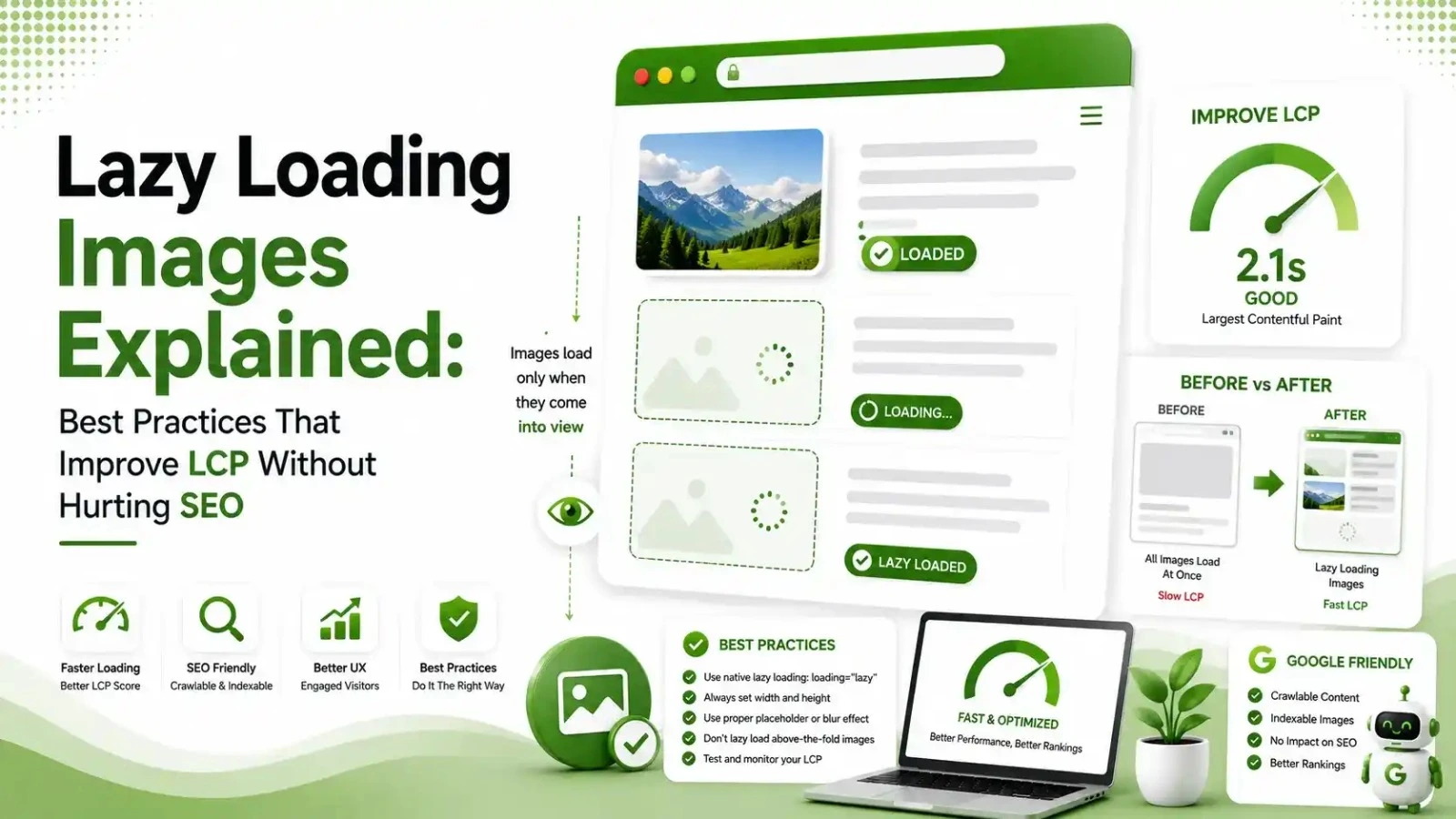
16% of sites still lazy load their LCP image, adding 600ms+ to load time. Here's how to lazy load correctly, with code, without hurting Core Web Vitals.
Table of Contents
ToggleLazy loading images is genuinely good advice, right up until someone applies it to the one image that matters most: the hero image sitting above the fold. That single mistake still shows up on roughly 16% of websites in 2026, and it adds 600 milliseconds or more directly onto LCP. Here is how to lazy load correctly, with code, so it helps your Core Web Vitals instead of quietly wrecking them.
Lazy loading defers the loading of off-screen images and other resources until a user actually scrolls near them, instead of downloading everything the moment a page opens.
Done correctly, it reduces initial page weight and speeds up perceived load time. Done on the wrong image, it delays the exact content Google is measuring for LCP.
We went deep on the loading metric itself in our LCP guide. This article covers the one lazy loading mistake that undoes almost everything else you might do right.
of websites still lazy load their LCP image, according to 2026 audits
average LCP delay added by lazy loading the hero image instead of loading it eagerly
browser support for the native loading="lazy" attribute, no JavaScript required
Above-the-Fold vs. Below-the-Fold: Where Lazy Loading Applies
The entire lazy loading debate comes down to one line drawn across the page.
The Lazy Loading Mistake That Hurts LCP
According to Ighenatt's 2026 lazy loading and SEO guide, applying lazy loading to the LCP image is the most critical mistake site owners make, and it can increase LCP by one to three full seconds on its own.
Here is the anti-pattern in code, followed by the fix.
<!-- The mistake: lazy-loading the hero image -->
<section class="hero">
  <img src="hero.webp" loading="lazy" alt="Welcome">
  <!-- This delays your LCP element unnecessarily -->
</section>

<!-- The fix: eager load plus a priority hint -->
<section class="hero">
  <img src="hero.webp" fetchpriority="high" alt="Welcome">
</section>
Removing loading="lazy" and adding fetchpriority="high" on the hero image alone
The Correct Lazy Loading Pattern for Everything Else
Below-the-fold images are exactly where lazy loading earns its keep. According to theStacc's 2026 lazy loading SEO guide, the native loading="lazy" attribute requires no JavaScript, works across virtually every modern browser, and is the method Google officially recommends.
<!-- Below-the-fold content image: safe to lazy load -->
<img
  src="product-photo.webp"
  loading="lazy"
  width="800"
  height="600"
  alt="Product detail shot"
/>
<!-- width/height prevents layout shift while it loads -->
Always pair loading="lazy" with explicit width and height to avoid a CLS penalty
Five Best Practices for Lazy Loading in 2026
Never Lazy Load the LCP Element
Identify your LCP element first using PageSpeed Insights or Lighthouse, then make certain it never carries a loading="lazy" attribute, regardless of what template or plugin generated the page.
Add fetchpriority="high" to Your LCP Image
According to Unlighthouse's guide on this exact anti-pattern, combining removed lazy-loading with fetchpriority="high" can improve LCP by 200 to 800 milliseconds on image-heavy pages.
Always Set Width and Height on Lazy-Loaded Images
Missing dimensions on lazy-loaded images cause the exact kind of layout jump we covered in our CLS guide, since the browser cannot reserve space without knowing the image's proportions in advance.
Watch Carousels Closely
According to WebGaro's 2026 LCP lazy loading guide, only the first carousel slide should load eagerly with fetchpriority="high". Slides 2, 3, and beyond should stay strictly lazy-loaded, since they are not visible on initial load.
Audit After Deploying, Not Just Before
Plugins, theme updates, and page builders can silently reapply lazy loading to a hero image after a fix ships. A periodic check keeps the fix from quietly reverting.
Native Lazy Loading vs. Intersection Observer
Most sites only need one of these two approaches. Tap through both to see which fits your situation.
According to Ighenatt's guide referenced above, native lazy loading is the practical recommendation for most sites in 2026. It needs no JavaScript and has 96% browser support.
Google can crawl and index images using it without any special handling since Googlebot executes JavaScript and processes the full page.
The Intersection Observer API offers more granular control, such as a custom rootMargin of 200 to 300 pixels to start loading slightly before an image enters the viewport.
Reserve this approach for cases genuinely requiring that extra control, since the added complexity outweighs the benefit in most ordinary scenarios.
Lazy Loading in React and Next.js
Framework defaults can quietly work against you here. Next.js's Image component lazy-loads by default, which is the right choice for most images but the wrong one for your hero image.
// Wrong: hero image lazy-loads by default
<Image src="/hero.jpg" alt="Hero" width={1200} height={600} />

// Right: priority prop disables lazy loading and preloads it
<Image src="/hero.jpg" alt="Hero" width={1200} height={600} priority />
Use the priority prop on exactly one image per page: the one that is your LCP element
Do's and Don'ts Quick Reference
| Situation | Do | Don't |
|---|---|---|
| Hero image / LCP element | Eager load, add fetchpriority="high" | Never add loading="lazy" |
| Below-the-fold images | Use native loading="lazy" | Don't skip width and height attributes |
| Carousel slides | Eager-load only the first visible slide | Don't eager-load every slide |
| Background images via CSS | Preload if part of LCP | Don't lazy load via JS if it affects LCP measurement |
Why This Mistake Keeps Happening on CMS-Built Sites
WordPress themes, page builders, and image optimization plugins commonly apply lazy loading sitewide by default, as a blanket setting rather than a deliberate, page-by-page decision.
According to Request Metrics' 2026 image optimization guide, both the loading and fetchpriority attributes are supported in every major modern browser.
The technical capability to fix this correctly has existed for a while. The gap is usually a default setting nobody has gone back to override for the specific hero image.
This is why the mistake resurfaces even on sites that fixed it once before. A theme update, a new plugin, or a redesigned homepage template can quietly reintroduce sitewide lazy loading defaults without anyone noticing until the next Core Web Vitals check.
Lazy Loading and the Rest of Your Image Strategy
Lazy loading is one piece of a broader image performance strategy, not a replacement for the rest of it. Compressing images, serving modern formats like WebP or AVIF, and using a content delivery network still matter regardless of which images are lazy-loaded.
According to Brandstory's 2026 lazy loading and LCP guide, a complete strategy combines eager loading for above-the-fold content, native lazy loading for everything else, and correctly applied priority hints.
Ongoing real-user monitoring through tools like Search Console confirms the changes actually improved LCP in production, not just in a lab test.
According to Image Compressor's guide to lazy loading done right, browsers try to download every image on a page immediately by default, even ones buried thousands of pixels below the fold, which is exactly the wasted bandwidth lazy loading is meant to solve when applied correctly.
How to Audit Your Site for This Mistake
Open your homepage in an incognito window, right-click your hero image, and choose Inspect. According to WebGaro's guide referenced above, if you see loading="lazy" sitting on that image tag, your theme or a plugin is quietly sabotaging your own page speed.
Confirm the diagnosis in Lighthouse or PageSpeed Insights. Both tools flag a "Largest Contentful Paint element was lazily loaded" warning directly when this specific issue is present, removing any guesswork from the audit.
FAQs on Lazy Loading Images and LCP
Related Articles
What We Learn Today
Never apply loading="lazy" to your LCP image or any above-the-fold content.
Add fetchpriority="high" to your confirmed LCP element for the biggest gain.
Native loading="lazy" is the Google-recommended default for everything below the fold.
Always pair lazy-loaded images with explicit width and height attributes.
In carousels, only the first visible slide should load eagerly.
Re-audit after theme, plugin, or framework updates, since defaults can silently revert.
Related Posts

Previous Post
Next Post





- Artificial Intelligence
- Content
- Core Web Vitals
- Development
- Digital Marketing
- Google Ads
- Google Search Console
- GTM
- HTML
- HTML CSS
- JavaScript
- Keyword Research
- Link Building
- Local SEO
- Meta Ads
- Mobile SEO
- Off-Page SEO
- On-Page SEO
- Paid Media
- Paid Media Analytics
- PHP
- PPC Strategy
- Python
- SEO
- SEO Basics
- SEO Tools
- Social
- Technical SEO




